
Spoke (Circuit) Route Planner
Circuit Routing LimitedMaps & Navigation
4.53.37K Reviews
- Version
- 3.68.12-16
- Installs
- 10.00M
- Age Rating
- Everyone
Screenshots
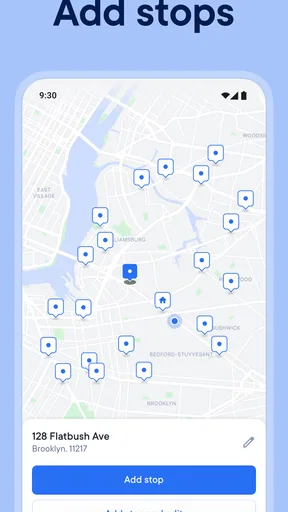
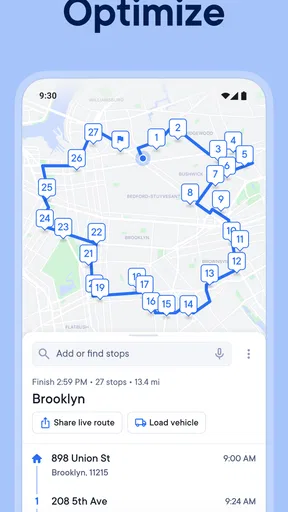
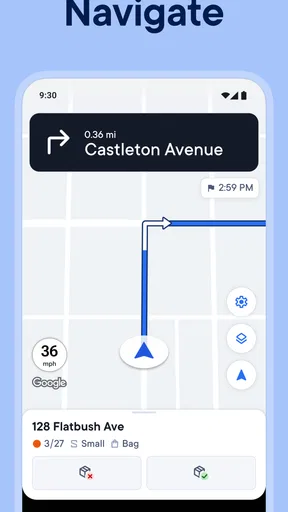
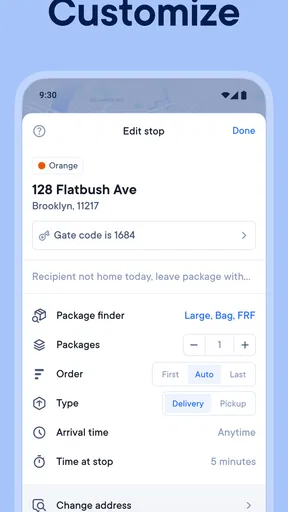
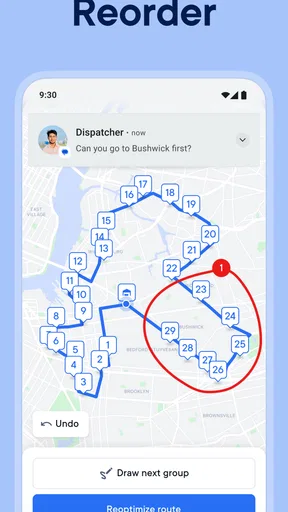
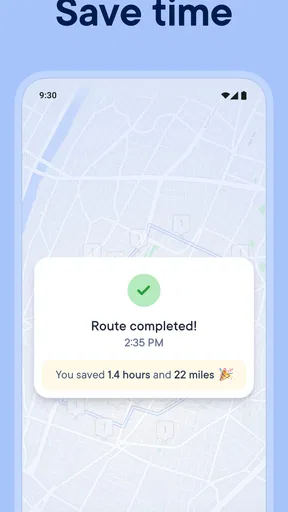
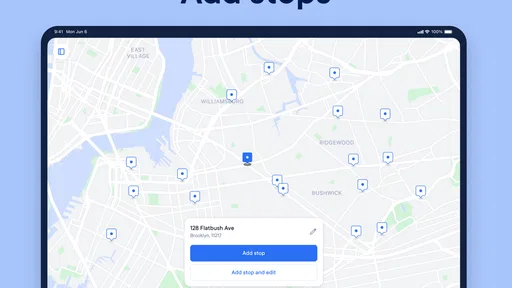
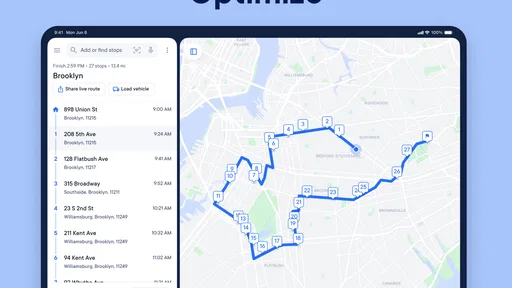
Our Review of Spoke (Circuit) Route Planner
 Analysis by Appyee
When several stops have to fit into one working day, I find the hard part is not simply getting from one address to another; it is deciding the order without wasting time doubling back. Spoke Route Planner, developed by Circuit Routing Limited, is built around that problem. It is a free maps and navigation app, and its multi-stop planning is the capability that matters most to me: rather than treating every destination as a separate trip, it helps organize a run of stops into a workable route.
Why planning several stops changes the day
A standard maps app is usually excellent when I need directions to one place. For a day with many addresses, though, I can end up entering destinations one at a time and making the sequencing decisions myself. That is where Spoke has a more useful focus. It is meant for people who need to visit multiple locations and want route planning to help them complete the work with less backtracking.
The difference is practical, not magical. A route planner can make the order easier to manage, but I still need to check that the proposed sequence suits the real job. A first stop may have a time constraint, a customer may need to be visited before another, or I may want to leave a particular address until I have the right supplies. I would treat the generated plan as a strong starting point, then make deliberate adjustments to reflect the day in front of me.
How I would use it on a working route
For a delivery or service round, I would begin by gathering the stops before setting off, rather than adding each one while already on the road. That gives me a chance to catch incomplete addresses and think about constraints that a route order cannot know. Once the stops are together, I can use the planned sequence as the backbone of the day and follow navigation from one destination to the next.
A small habit makes multi-stop planning more dependable: keep a separate note of any visit that must happen at a particular time or in a particular order. Then compare that note with the route before leaving. This avoids assuming that an efficient sequence automatically accounts for appointments, access arrangements, or the amount of time a job takes. The planner can reduce the mental load of organizing locations; it cannot make those real-world decisions for me.
Imagine a local tradesperson with several appointments spread across town. Instead of choosing the next address by instinct after every visit, they can prepare the day as a group of stops and use a planned route to avoid unnecessary crisscrossing. If a customer calls to change arrangements, the useful response is to pause somewhere safe, reassess the remaining stops, and make a revised plan—not to handle route changes while driving. That is the sort of everyday workflow where a dedicated planner can feel more valuable than a map used one destination at a time.
Where it fits among navigation apps
Compared with a familiar turn-by-turn maps app, Spoke’s appeal is the multi-stop job rather than a single journey. If I am heading to one café or taking a simple trip across town, a conventional map is likely to be enough and may be quicker to open. If I have a list of addresses to cover, a route planner gives that list more structure and makes the order itself part of the planning task.
That distinction also helps set expectations. Spoke is not a substitute for judgment about which roads feel appropriate, whether a stop is open, or how long a visit will take. Nor would I choose it just because I want an exploratory ride with no fixed destination. Its clearest value is for people who already know where they need to go and want help arranging a sequence of stops into a navigable day.
Useful checks before setting off
There are a few easy ways to get more from a multi-stop route. First, standardize address details when preparing a list: a missing unit number or ambiguous street can create confusion at exactly the moment I want to be moving quickly. Second, review the order against appointment windows and any personal priorities. Third, leave room for delays rather than treating the estimated plan as a promise that every stop will happen on schedule.
I would also think about how I want to use navigation before starting. Repeatedly checking a phone while moving is distracting, so I prefer to review the route while parked and follow the directions only when it is safe. If a stop becomes impossible, it is better to reconsider the remaining sequence from a safe place than to make a rushed decision at the roadside. These are simple habits, but they matter more on a long list of stops than on a one-off trip.
Who will benefit—and who may not
The strongest fit is a courier, field worker, mobile service provider, or anyone handling several errands across a day. It can also help a household planning a cluster of appointments or pickups, especially when the stops are spread out and the order is not obvious. The central benefit is having one planned sequence to work from, rather than repeatedly deciding where to go next.
Someone who mostly navigates to one destination at a time may not need a dedicated multi-stop tool. A regular maps app is often the simpler choice for a straightforward commute, a casual outing, or a spontaneous trip where the destination matters more than optimizing a list. And if a route depends on detailed scheduling or unusual access needs, I would keep those constraints visible in my own notes instead of expecting the route planner to infer them.
Spoke is free to download, with in-app purchases listed from $1.49 to $209.99 per item, so I would check the purchase details in the app before committing to anything beyond the free experience. It is rated for Everyone and has a 4.5 average from around 177,000 ratings, with over 10 million installs. Those figures suggest broad uptake, but they do not tell me whether its workflow suits my particular kind of route; the best test is whether its way of handling multiple stops matches the work I actually do.
The app’s listing identifies version 3.62.1 and an Android minimum of 8.0. I would check compatibility on my own device before planning to rely on it for a workday. The developer, Circuit Routing Limited, presents it as a route-planning product for getting through multiple destinations, and that specific job is where I would judge it—not by whether it replaces every map or navigation tool I already use.
My overall view is that Spoke makes sense when the route itself is a recurring task. Its value comes from turning a collection of destinations into a plan I can follow, while the user still checks timing, address quality, and practical priorities. If that sounds like the problem I face most days, it is worth trying; if I mainly need directions to one place, I would stick with a simpler navigation option.
Are you someone who loves cycling but often finds yourself tangled in the web of route planning? Well, let me introduce you to a nifty little app that’s about to become your new best friend: Spoke (Circuit) Route Planner. I’ve taken it for a spin, and I’m here to spill the beans on what makes it tick and why it might be the perfect companion for your biking adventures.
Getting Started with Spoke
First things first, downloading and setting up the Spoke (Circuit) Route Planner is a breeze. Available on both Android and iOS, it’s just a quick trip to the app store, and you’re ready to roll. The interface is clean and intuitive, which is fantastic if you’re like me and prefer to spend more time riding and less time figuring out tech stuff.
Once you’ve got it up and running, you’ll notice how the app is designed to make route planning as simple as possible. It’s like having a digital map in your pocket, but way cooler and more interactive. You can easily input your starting point and destination, and Spoke does the rest.
Features That Stand Out
One of the standout features of Spoke is its ability to generate multiple route options. Whether you’re in the mood for a leisurely ride through scenic backroads or you need a speedy path to your destination, Spoke has you covered. The app provides detailed information on each route, including distance, estimated time, and difficulty level.
But wait, there’s more! Spoke also integrates real-time weather updates. This is a game-changer, especially if you’re planning a long ride and want to avoid unexpected showers. Just a quick glance at the app, and you’ll know whether to pack that rain jacket.
Community and Connectivity
Another cool feature is the social aspect of Spoke. You can connect with other cyclists, share your favorite routes, and even join group rides. It’s like having a community of biking enthusiasts right at your fingertips. Plus, the app syncs seamlessly with health and fitness trackers, so you can keep tabs on your performance and progress over time.
What’s more, the app’s connectivity doesn’t stop there. You can sync Spoke with your smart devices, making it easy to track your rides directly from your smartwatch. It’s all about making your cycling experience as smooth and enjoyable as possible.
Navigation and Safety
Now, let’s talk navigation. Spoke offers turn-by-turn directions, ensuring you won’t miss a beat on your ride. The audio prompts are clear and timely, which is perfect if you’re not keen on constantly glancing at your phone. Safety is a big deal, and Spoke takes this seriously by offering features like route elevation previews and hazard alerts.
And here’s something that really caught my attention: the app’s night mode. If you’re someone who enjoys evening rides, this feature is a lifesaver. It reduces screen glare, making it easier on the eyes and helping you focus on the road ahead.
Final Thoughts
All in all, the Spoke (Circuit) Route Planner is a fantastic tool for cyclists of all levels. Whether you're a casual rider or a seasoned pro, this app offers something for everyone. Its user-friendly design, comprehensive features, and community connectivity make it a must-have for anyone serious about cycling.
So, if you’re looking to enhance your biking experience, give Spoke a shot. It’s like having a personal cycling assistant, ensuring every ride is an adventure worth taking. Happy cycling!
Verdict
Strengths of Spoke (Circuit) Route Planner
- Intuitive interface for easy navigation.
- Customizable routes to fit your needs.
- Real-time traffic updates included.
- Supports multiple destinations efficiently.
- Offline maps available for convenience.
Limitations of Spoke (Circuit) Route Planner
- Limited free features available.
- Occasional lag in map loading.
- Battery consumption can be high.
- Requires stable internet for updates.
- Premium subscription is pricey.
Similar Picks in This Category
View All
Uber - Request a ride
Uber Technologies, Inc.4.7


inDrive. Rides with fair fares
® SUOL INNOVATIONS LTD4.8

Yandex Go: Taxi Food Delivery
Mikromobilnost LLC Belgrade4.8

Bolt: Request a Ride
Bolt Technology4.8

Rapido: Bike-Taxi, Auto & Cabs
Rapido Bike Taxi4.8
Frequently Asked Questions
What is Spoke (Circuit) Route Planner and how does it work?
Spoke (Circuit) Route Planner is a navigation app designed to optimize delivery routes for drivers. It uses advanced algorithms to calculate the most efficient path, saving time and fuel. Users simply input multiple destinations, and the app provides the quickest route, helping to reduce travel time and increase productivity.
Is Spoke (Circuit) Route Planner available for both Android and iOS devices?
Yes, Spoke (Circuit) Route Planner is available for both Android and iOS platforms. Users can download it from the Google Play Store or the Apple App Store, ensuring compatibility with a wide range of smartphones and tablets, making it accessible for almost all delivery drivers.
Does Spoke (Circuit) Route Planner require an internet connection to function?
While an internet connection is required for initial route setup and updates, Spoke (Circuit) Route Planner offers offline functionality. Once the route is downloaded, it can be accessed without an active internet connection, allowing drivers to navigate areas with poor or no connectivity.
Can I customize my routes in Spoke (Circuit) Route Planner?
Yes, the app allows users to customize routes according to specific needs. You can add, remove, or reorder stops, set priority on certain deliveries, and specify time windows. This flexibility ensures that the route aligns perfectly with your schedule and delivery requirements.
Is there a cost associated with using Spoke (Circuit) Route Planner?
Spoke (Circuit) Route Planner offers both free and premium versions. The free version includes basic features, while the premium version provides advanced functionalities such as unlimited stops and enhanced route optimization. Users can choose the version that best suits their needs and budget.
